
Nov 25
Litespeed Cache Compatibility
I know a feature request for all cache plugins is open, but the one I think is most important if you can only add them one at a time.
Pending
Just to add, You can use litespeed with woodmart, using minimal settings, this does give you great results, BUT! and its a big one, if Woodmart at least had a general guide related to their product, not other plugins (thats for us to investigate) this would at least help to optimise LS Cache further. I have a woo store using Woodmart and LS Cache which once the cache is primed is super fast (almost instant) on the front end and uses a lot less CPU/Memory than Wp-rocket. I just get stuck on what not to cache (obvious exclusions like wishlist etc are easy) so I leave it with minimal caching which is far superior than wp-rocket anyway. Not as clean on pagespeed insights but thats another story about over caching anyway.
I just commented on your new performance guide (WoodMart Optimization Guide 8th JUL 2026). I strongly agree with the feedback regarding the lack of focus on LiteSpeed. Recommending WP-Rocket to users on a LiteSpeed stack doesn't make much sense. WP-Rocket only handles local caching, whereas LiteSpeed operates far more efficiently at the server level, making WP-Rocket redundant. We really need official, optimized integration for LiteSpeed setups. Honestly, pushing WP-Rocket over LiteSpeed is a miss. WP-Rocket can't do server-side caching, which is where LiteSpeed shines by using server resources efficiently and eliminating the need for bulky local caching plugins. I highly recommend checking out the new optimization guide, it has some great tips for tuning WoodMart. It’s also the perfect opportunity to leave a comment on the blog post and voice your support for official LiteSpeed Cache integration. (or at least a general guide)
+1
This is really the top issue for us with Woodmart. Its the difference between a slow site (after all other optimizations) and a very fast website. Site speed makes or breaks Webshop success. The advice we get from all professionals is to ditch Woodmart and switch to a compatible theme. Even AI states this. Im sure Woodmart is loosing customers over this.
+1 to give guidance to users wanting to use lightspeed cache. It is almost like guesswork to know why things are broken and to scroll through plenty of support requests and issues on the internet.
We are also using Litespeed server, and Litespeed caching plugin.. and this compatibility would be a amazing boost... and very much necessity..
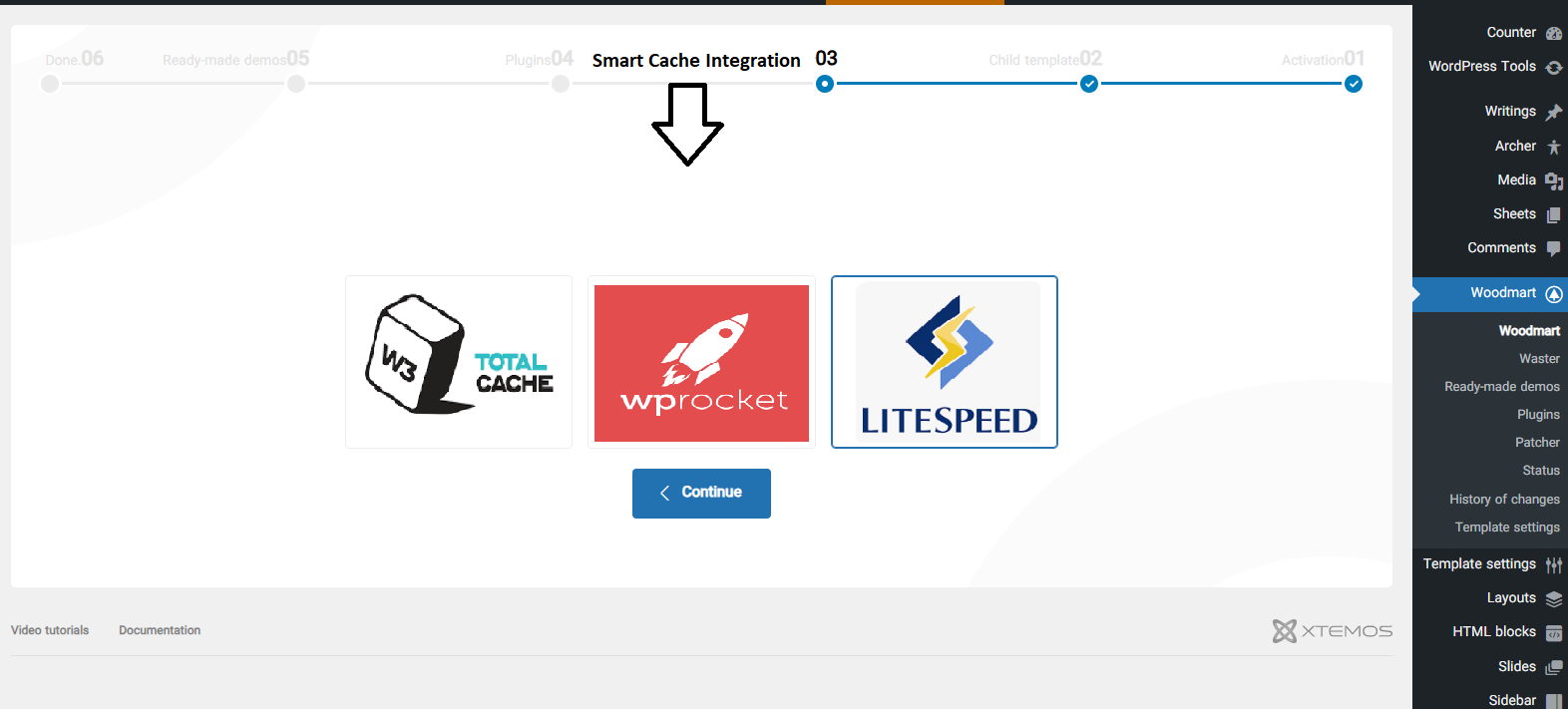
Unified Cache Integration Setup (Like Page Builder Selector) Hi Woodmart Team, First of all, thank you for your continuous improvements and support — Woodmart remains one of the most powerful and well-optimized WooCommerce themes available. I’d like to suggest a new feature that could further enhance flexibility and user experience: Unified Cache Integration Setup. Currently, when activating the theme, Woodmart allows users to select their preferred Page Builder (Elementor, WPBakery, or Gutenberg), automatically configuring templates, layouts, and theme options accordingly. I believe a similar setup could be implemented for cache management, allowing users to choose their preferred cache plugin during the initial configuration step, such as: LiteSpeed Cache WP Rocket Woodmart Native Cache (built-in minimal mode) — for users who prefer fewer plugins Once selected, the theme could: Automatically detect and configure compatibility with the chosen cache plugin. Load optimized performance settings, preload rules, and recommended exclusions based on the selected plugin. Optionally hide conflicting cache options from other plugins to prevent redundancy. This would create a centralized and conflict-free cache management experience, similar to how the page builder selection works — making it easier for users to achieve optimal performance without extra configuration. By integrating through the official hooks and filters of major cache plugins (like LiteSpeed and WP Rocket), Woodmart could ensure maximum compatibility, stability, and performance even after updates. Ultimately, this unified cache setup would make Woodmart even more beginner-friendly while maintaining professional-level flexibility — perfectly aligning with your philosophy of providing an all-in-one eCommerce solution. Thank you for considering this idea! I’m confident that this enhancement would further strengthen Woodmart’s reputation as one of the most advanced WooCommerce themes on the market. Best regards, [Mohammad]
On the same server we have large sites with woodmart + wp-rocket and large sites without woodmart with LiteSpeed cache. Thousands of products and many images. Sites with litespeed cache: 99% speed score. Sites with wp-rocket: 60% speed score. Its not even close. There are 100+ support questions in your forum from people with broken LiteSpeed sites: https://www.google.com/search?q=site:xtemos.com+"litespeed+c… Advise from our host and designers: don't use Woodmart on LiteSpeed. :(
Ananda Hi, i do not think is ANY problem with LiteSpeed Cache and Woodmart. Just Focus and Learn how to Setup Properly the LiteSpeed on the webstie( it is not easy LiteSpeed Cache has many parameters that have to be Calculated ). I use LiteSpeed for all my Cilents Ecommerce website with Woodmart.
Great, then since you knnow how to configure it, maybe you can explain instead of saying a lesson with 0 info
Please add this! Litespeed cache is the best caching for WordPress, but no woodmart support. There should also be a check on conflicting settings between Woodmart settings and Litespeed. Support for ESI and guest caching would make Woodmart load superfast. Just contact Michael at Litespeed. They would love to work with you.
Please fix this thank you
Hope this is planned soon. Litespeed is one of the most famous cache plugins and Woodmart have a lot of features that don't work with Litespeed
Earlier, it worked seamlessly, but now there are several compatibility issues, especially when selecting the advanced preset.
Hello Xtemos Development Team, I am currently using the WoodMart theme and would like to optimize my site’s performance with Lightspeed. Could you please provide an article or detailed guide on the best practices and recommended settings to integrate and configure Lightspeed with WoodMart? A step-by-step guide including cache settings, image optimization, and any theme-specific configurations would be extremely helpful. This would ensure compatibility and optimal performance while avoiding common issues.
I would really like to see this. I am hosted on the Litespeed server. There are conflicts with the theme, for this reason many functions are disabled. I hope that they will add it soon.
There is no page on the internet that I have not searched for about the correct settings for the Woodmart template with the Litespeed plugin I hope that an article has been added about this because it is very important
One significant issue that arises when using LiteSpeed Cache to delay JavaScript execution with the WoodMart theme is that the desktop and mobile mega-menu widgets stop functioning; notably, this problem does not occur with cache plugins like WP Rocket or Perfmatters. Therefore, I request that the WoodMart theme developers resolve this issue in future updates. Thank you.