
Jun 21
I’m currently using the Woodmart theme for my WooCommerce store and I would like to modify the way product color variations are displayed.
Hello Support Team,
I’m currently using the Woodmart theme for my WooCommerce store and I would like to modify the way product color variations are displayed.
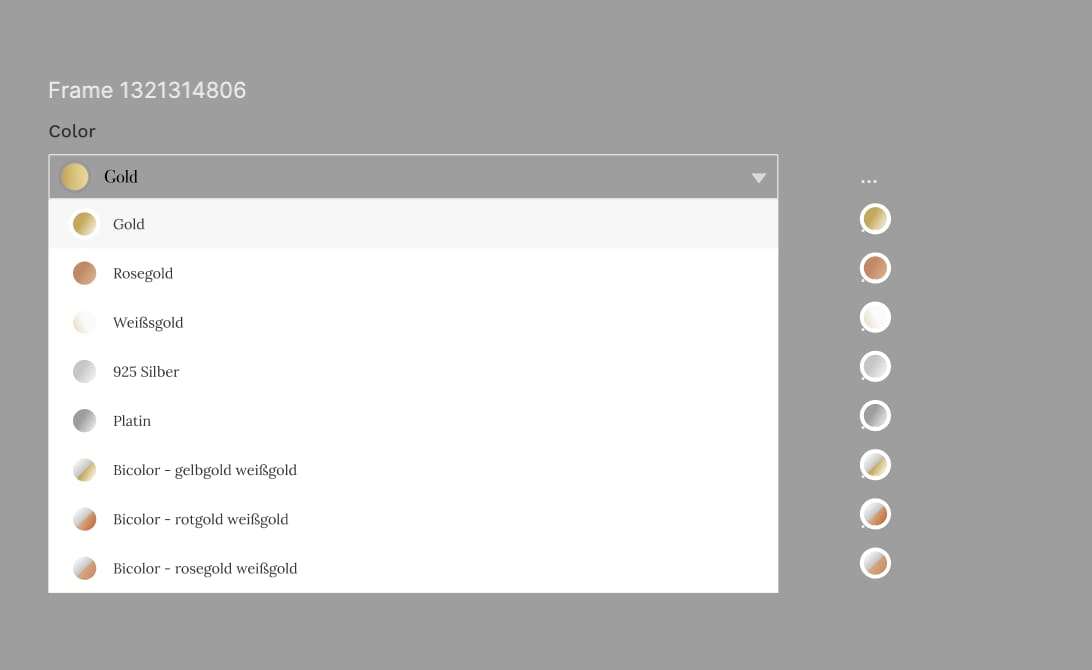
By default, the color variations are shown as color swatches (circles), but for one of my product categories, I would like to display the “Color” attribute as a dropdown selector instead — similar to a standard HTML select box.
Please see the attached screenshot for a visual example of the desired layout. In this layout, customers can choose between options like “Gold”, “Rosegold”, “White Gold”, etc., from a dropdown menu. This method is more suitable for the specific product type and provides a cleaner user experience in this case.
Here are the key points of my request:
I would like only the “Color” attribute to appear as a dropdown, while other attributes (like size or material) can remain as swatches if needed.
I’m using Woodmart’s built-in variation swatches.
Ideally, I’d like this dropdown style to be applied only to specific product categories or products.
If a code snippet or filter is required to enable this behavior, I would appreciate detailed guidance or a hook reference.
Could you please assist me with the best way to achieve this — either via theme settings, custom code, or child theme adjustments?
Thanks in advance for your support.
Best regards,
Emre Sarıyıldız
Pending