
WoodMartW
WoodMart
Sep 8

Email notify customer when product is back in stock

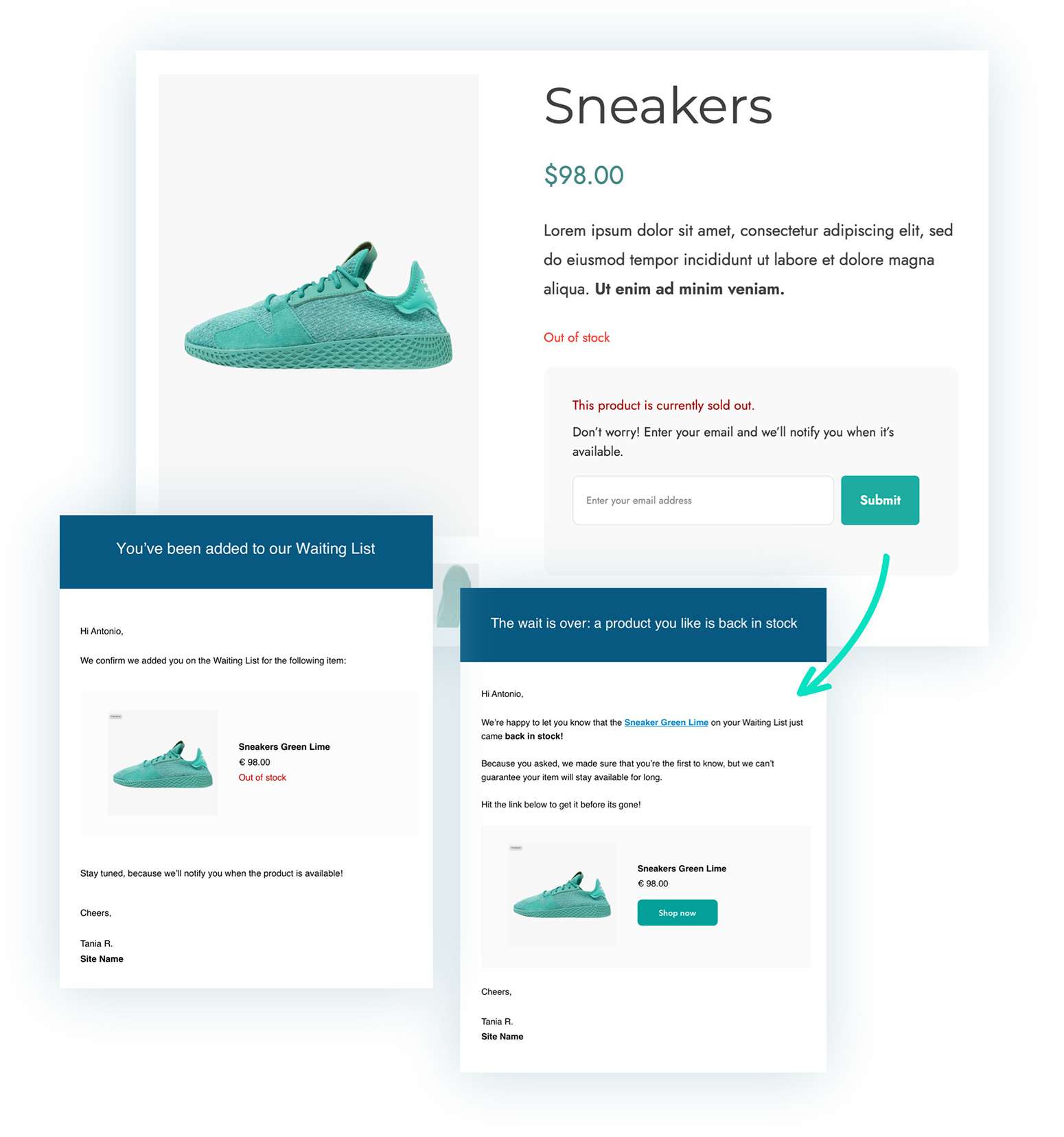
If a product is sold out, then give the customer the option to receive an email when its available. On the product page display a field where the customer can enter their email address and submit. Then when the product is back in stock, send a nice email to the customer notifying them that the product is available for purchase again, with a link to the product. Optimally it would be great if webmasters can see which products customers are waiting on so that we know where we are missing sales. We are currently using YITH Waitlist for this, but I'm certain that a Woodmart implementation would be better.
CompletedCompleted

Aug 19, 2024

Hi John Thanks so much for your quick reply! All your points are very useful. It would be handy to know about these in the email that says there is a Theme Upgrade, along with the documentation. When I upgraded it just took me to a screen that had a demo - but it doesn't tell you where things are located like below. Is there any way to bring across another list (we have a plug in for this just now?) I will look at this in more detail later this week. Thank you Amy

Aug 19, 2024

Released in update 7.6

Aug 19, 2024

John Morgan That's great thanks! My current plug in lets you customise the email that the customer gets, but I don't see if this is a possibility here - also what is the wording that the customer gets? Is there is picture? Is the email automatic when the item is back in stock? Also in the admin section can you see how many are on each list? There is no instructions with the update, and so these questions are my initial thoughts. Thank you Amy

Aug 19, 2024

John Morgan will the implementation also include a way to see what products customers are waiting for? This feature is really useful.

Aug 19, 2024

Amy Skea 1. The email content settings are available in the standard email editing location in WooCommerce, which can be found at WC->Settings->Emails->Waitlist - Product back in stock (the email template you need to modify) https://monosnap.com/file/6G1PF5kOqevcj6X6C210PpmR1GdfqZ. 2. Yes, by default, the email template includes the product image. 3. After the product is back in stock, the email is sent automatically. 4. You can view the products that have been added to the waitlist by your customers on a special page located under Products -> Waitlists https://monosnap.com/file/XoSWn0VZoQCIvPheoHKDQrHgtcF4xw. The documentation is available at the following link https://xtemos.com/docs-topic/waitlist/, and we will be expanding it shortly to include the points you mentioned.

Aug 19, 2024

Ananda You can view the products that have been added to the waitlist by your customers on a special page located under Products -> Waitlists https://monosnap.com/file/XoSWn0VZoQCIvPheoHKDQrHgtcF4xw.

Mar 7, 2024

This good of use digits number to send sms to user when product is available

Jan 24, 2024

Will be very useful and we can delete another plugin

Jan 21, 2024

This is one of the most important features of online stores and it is really good that the Woodmart template has this feature. There is no need to install a separate plugin.

Jan 10, 2024

It would be better if this could be compatible with the Digits plugin (login and registration with mobile) and if you could enter a mobile number instead of email (to receive SMS).

Jan 10, 2024

Very useful

Jan 10, 2024

It would be better if this could be compatible with the Digits plugin (login and registration with mobile) and if you could enter a mobile number instead of email (to receive SMS).

Jan 10, 2024

nice option, iwant

Jan 10, 2024

good option ..love

Sep 27, 2023

Related suggestion: Display Products back in stock: https://woodmart.canny.io/feature-requests/p/products-availa…

Sep 21, 2023

Even better if there is an option to get notified also by phone number.